
Home · Help · Game server restarts
Setting up game server restarts
You decide in the customer portal when your game server restarts: in the „Einstellungen“ (Settings) card, „Neustarts“ (Restarts) group. Every change is saved automatically.
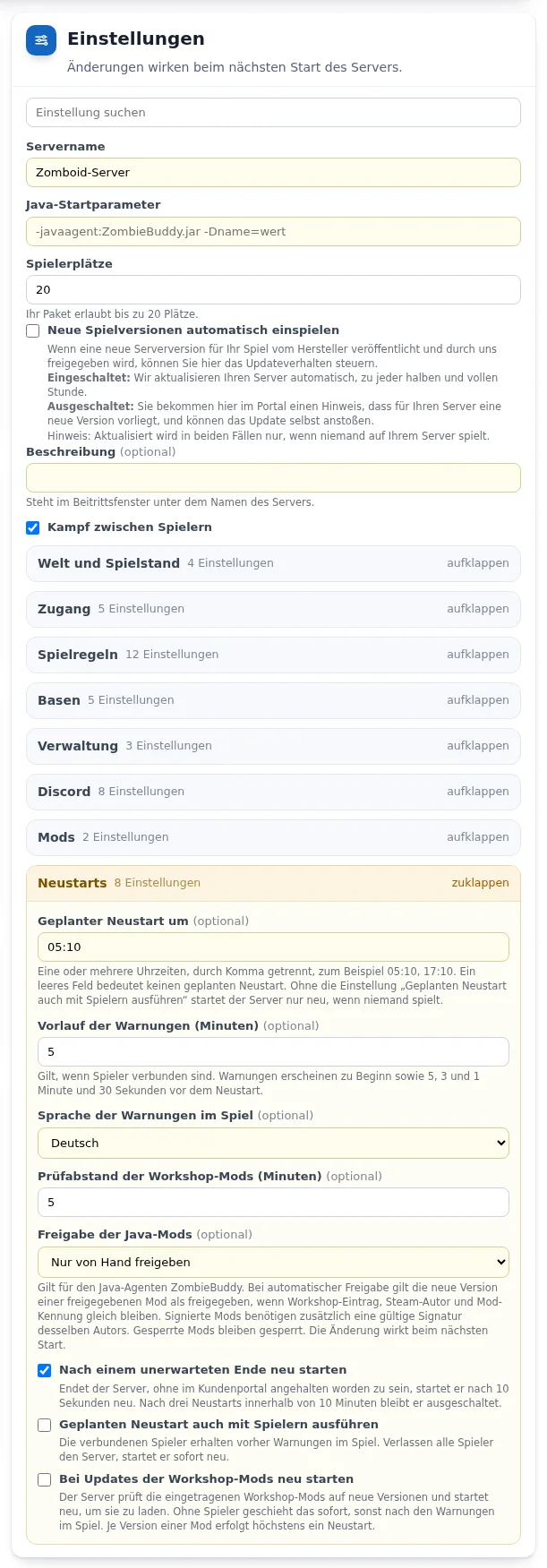
Scheduled restart
- In the „Geplanter Neustart um“ (Scheduled restart at) field, enter one or more times separated by commas, for example
05:10, 17:10. Up to 6 times are allowed. - The default is 05:10. If the field is empty, the server does not restart on a schedule.
- If nobody is on the server at that time, it restarts immediately.
Restart after an unexpected stop
With „Nach einem unerwarteten Ende neu starten“ (Restart after an unexpected stop, default: on), the server starts again after 10 seconds if it stops without you having stopped it in the customer portal, for example after a crash.
If the server stops this way three times within 10 minutes, it stays off. This way a faulty mod cannot restart the server endlessly. The customer portal then shows „Automatisch ausgeschaltet nach 3 Abbrüchen“ (Switched off automatically after 3 stops) and the „Wieder starten“ (Start again) button.
Project Zomboid: warnings and restarts with players online
- „Geplanten Neustart auch mit Spielern ausführen“ (Run scheduled restart even with players online, default: off).
- „Vorlauf der Warnungen (Minuten)“ (Warning lead time in minutes): 1 to 30, default 5. Players see an in-game warning at the start of the lead time and 5, 3 and 1 minute and 30 seconds before the restart. If all players leave the server, it restarts immediately.
- „Sprache der Warnungen im Spiel“ (Language of in-game warnings): German or English, default German.
- When you switch off, restart or change the game, Project Zomboid saves the world before the server stops.
Project Zomboid: restart on Workshop mod updates
From Flex M, with mods enabled. With „Bei Updates der Workshop-Mods neu starten“ (Restart on Workshop mod updates, default: off), the server regularly compares the installed version of each Workshop mod with the version in the Steam Workshop. If there is an update, it restarts: immediately without players, otherwise after the warnings. It restarts at most once per new version of a mod.
- „Prüfabstand der Workshop-Mods (Minuten)“ (Workshop mod check interval in minutes): 2 to 1440, default 5.
- Deleted, blocked or foreign Workshop items appear as a warning.
Project Zomboid: approval of Java mods
From Flex M, with ZombieBuddy. Under „Freigabe der Java-Mods“ (Approval of Java mods), you choose how new versions of your Java mods are handled:
- „Nur von Hand freigeben“ (Approve manually only, default): every new version stays blocked until you approve it in the „Java-Mods“ card.
- „Updates freigegebener Mods automatisch freigeben“ (Approve updates of approved mods automatically): a new version counts as approved if the Workshop item, Steam author and Mod ID stay the same. Signed mods also need a valid signature from the same author. Blocked mods stay blocked. The mods are updated before the start, so no second restart is needed.
- „Alle Java-Mods ohne Prüfung laden“ (Load all Java mods without checks): every Java mod is loaded. Java mods run with all the rights of the server, so only choose this for mods you trust.
You set this approval only here, no longer in the „Java-Startparameter“ field. More under Setting up Java mods with ZombieBuddy.
Reviewing restarts and events
The „Neustarts und Ereignisse“ (Restarts and events) card lists automatic restarts with their reason and, where applicable, the mod, a server stopping on its own, switching off after 3 stops, automatic approvals and warnings. For Project Zomboid it also shows how many Java mods were blocked at the last start.
Frequently asked questions
- My server is off and does not start on its own. Why?
- It stopped unexpectedly three times within 10 minutes and therefore stays off. Check recently changed mods or settings, then select „Wieder starten“ (Start again).
- Does Project Zomboid also restart while people are playing?
- Only if you switch on „Geplanten Neustart auch mit Spielern ausführen“. The server then warns the players in the game beforehand, and the world is saved before the restart.
- Can I switch off the scheduled restart?
- Yes. Leave the „Geplanter Neustart um“ field empty.
See also: Setting up Project Zomboid mods Setting up Java mods with ZombieBuddy Project Zomboid: sandbox settings