
Home · Help · Garry's Mod server settings
Garry's Mod server settings: gamemode, map, Workshop
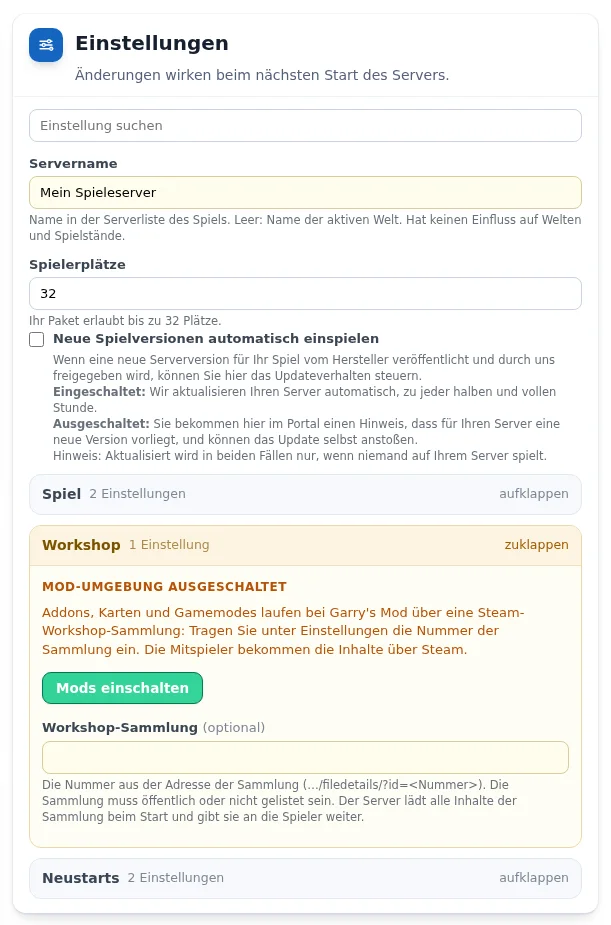
The settings of your Garry's Mod server are in the „Einstellungen“ (Settings) card in the customer portal and are saved automatically. A server allows up to 32 players, a limit set by the game. How the cards work in general is described under Managing a game server in the customer portal.
Gamemode and start map
- „Gamemode“ in the „Spiel“ (Game) group: the folder name of the gamemode. Garry's Mod includes
sandboxandterrortown(Trouble in Terrorist Town). Other gamemodes such asprop_huntordarkrpcome from the Workshop collection. - „Startkarte“ (Start map): the map name without extension. Included are
gm_constructandgm_flatgrass, further maps also come from the Workshop collection.
Addons, maps and gamemodes from the Workshop
- Put together a collection in the Steam Workshop with all the addons, maps and gamemodes you want. The collection must be public or unlisted.
- From Flex M, open the „Workshop“ group in the „Einstellungen“ (Settings) card and select „Mods einschalten“ (Switch on mods).
- Enter the collection number under „Workshop-Sammlung“ (Workshop collection), the number in the address after
?id=. - Restart the server. It downloads all content of the collection at startup and passes it on to the players. Other players receive the content via Steam.
32-bit or 64-bit
In the „Verbindung“ (Connection) card, choose between 32 and 64 bit under „Steam-Zweig“ (Steam branch) and confirm with „Zweig wechseln“ (Switch branch). What to consider is described under Garry's Mod: enabling the 64-bit server.
Banning and kicking players
In the „Spieler“ (Players) card you ban, unban and kick players. A player's ID is their SteamID64. In Garry's Mod you assign administrators with an admin addon from the Workshop collection, not in the customer portal.
Uploading your own state
In the „Mods und eigene Welt hochladen“ card with the type „Welt“ (World): an archive (.zip or .tar.gz) containing the sv.db, where Garry's Mod stores the server's data. The server stops, backs up the old state, replaces it and starts again.
Frequently asked questions
- Why doesn't the server load my addons?
- Check that the mod environment is switched on in the „Workshop“ group and that the collection is public or unlisted. The server cannot load a private collection.
- How do I play Trouble in Terrorist Town?
- Enter
terrortownas the gamemode and choose a suitable map, for example from a Workshop collection with TTT maps.
See also: Garry's Mod: 64-bit Managing a game server in the customer portal Connecting players