
Home · Help · Core Keeper server
Core Keeper server: Game ID, game mode and mods
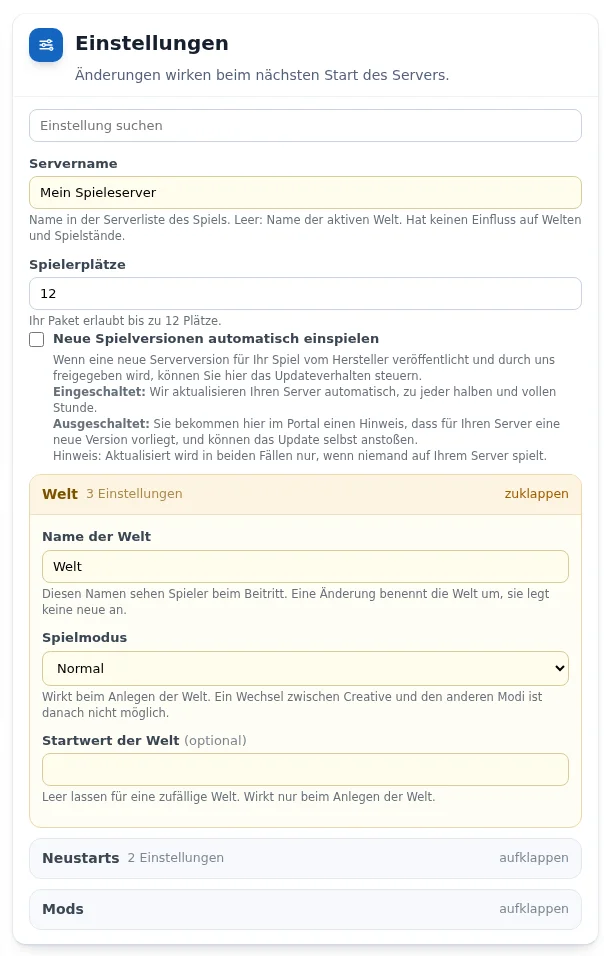
The settings of your Core Keeper server are in the „Einstellungen“ (Settings) card in the customer portal and are saved automatically. How the cards work in general is described under Managing a game server in the customer portal.
Joining via Game ID
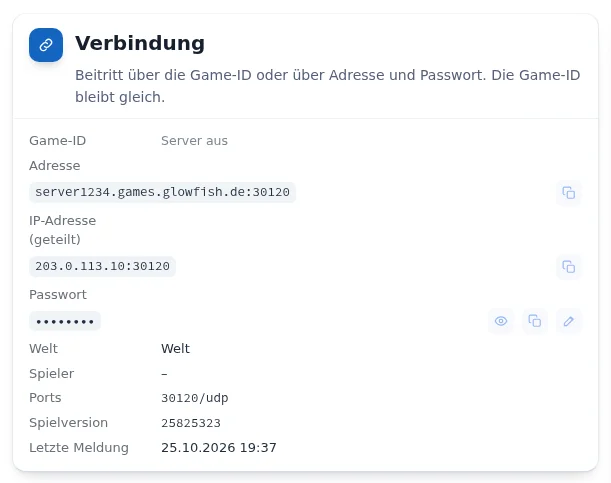
While the server is running, the „Verbindung“ (Connection) card shows the Game ID. Other players join in the game with this ID, or alternatively via address and password. The Game ID stays the same, also after a restart.
World and game mode
- „Name der Welt“ (World name): players see this name when joining. Changing it renames the world, it does not create a new one. Core Keeper always saves to a fixed slot, so there is no „Welten“ (Worlds) card.
- „Spielmodus“ (Game mode): Normal, Hard, Casual or Creative. Takes effect when the world is created. Switching between Creative and the other modes is not possible afterwards.
- „Startwert der Welt“ (World seed): empty for a random world, only takes effect when the world is created.
Mods and your own world
From Flex M you switch on the mod environment in the „Mods“ group and upload mods as .zip in the „Mods und eigene Welt hochladen“ card. There is no guarantee for operation with mods. You upload your own world there with the type „Welt“ (World), as an archive containing worlds/0.world.gzip. The server stops, backs up the old state, replaces the world and starts again.
Frequently asked questions
- Where do I find the Game ID?
- In the „Verbindung“ (Connection) card, as soon as the server is running.
- Can I switch from Creative to Normal later?
- No. Switching between Creative and the other modes is not possible after the world has been created. A different mode requires a newly created world.
See also: Managing a game server in the customer portal Connecting players