
Home · Help · Connect AI assistants
Connect AI assistants to Glowfish
Through the AI interface (MCP) your AI assistant works directly with your customer account: it shows the status of your servers, sets up mailboxes, builds websites, restarts game servers, lists open invoices and opens support tickets.
Dedicated MCP endpoint https://mcp.glowfish.de/mcp (Streamable HTTP), login via OAuth 2.1 or a personal bearer token. Every tool is marked as read-only, additive or modifying. An overview of all tools is below.
1. Connect
Add a custom MCP connector (remote MCP server) with this address in your AI application:
https://mcp.glowfish.de/mcp
The application redirects you to log in to the customer portal. Then you choose which servers and services it may access and which rights it receives.
Claude (app and claude.ai)
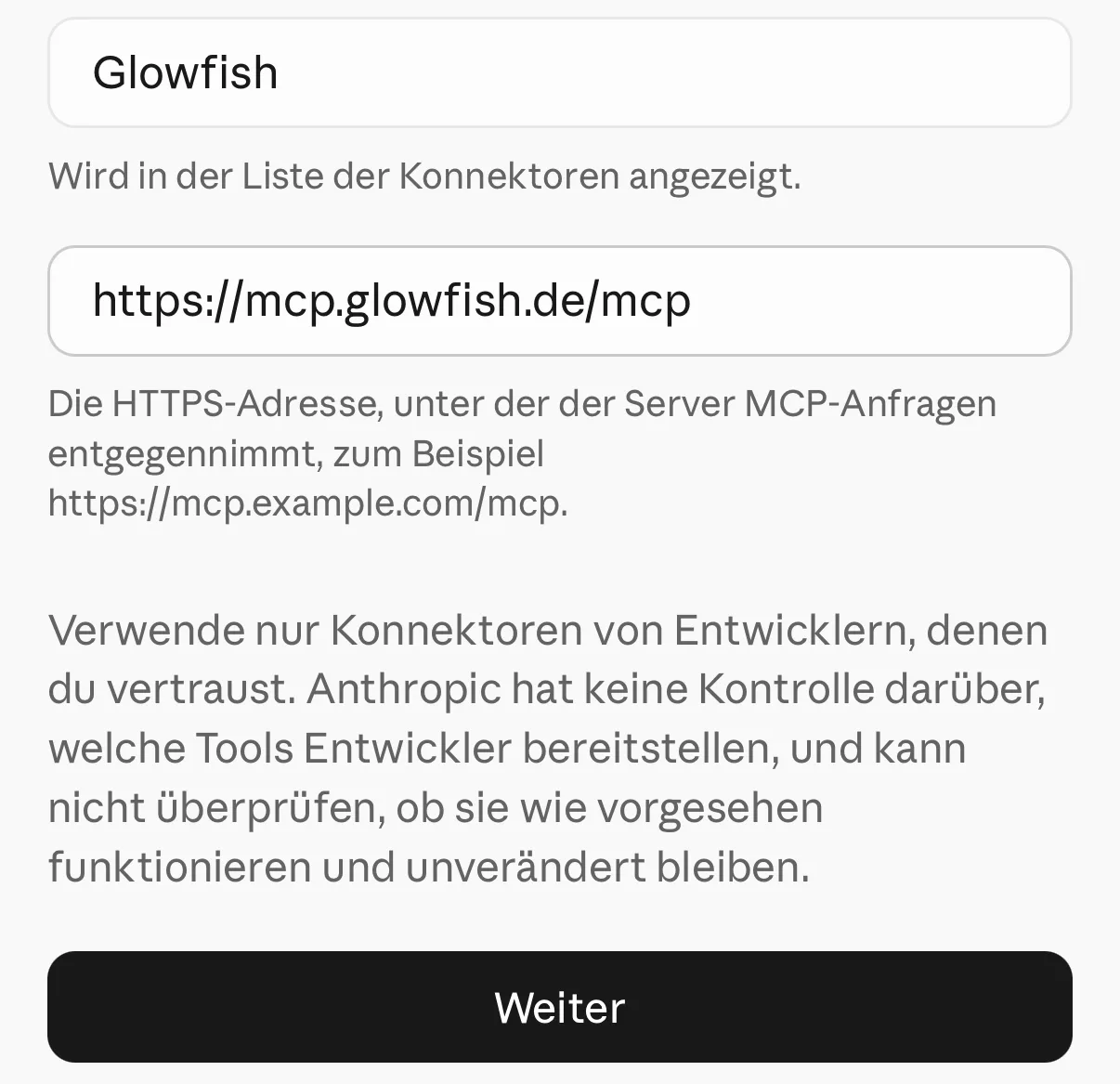
- Settings → Connectors → “+” (add custom connector).
- Enter the name “Glowfish” and the address
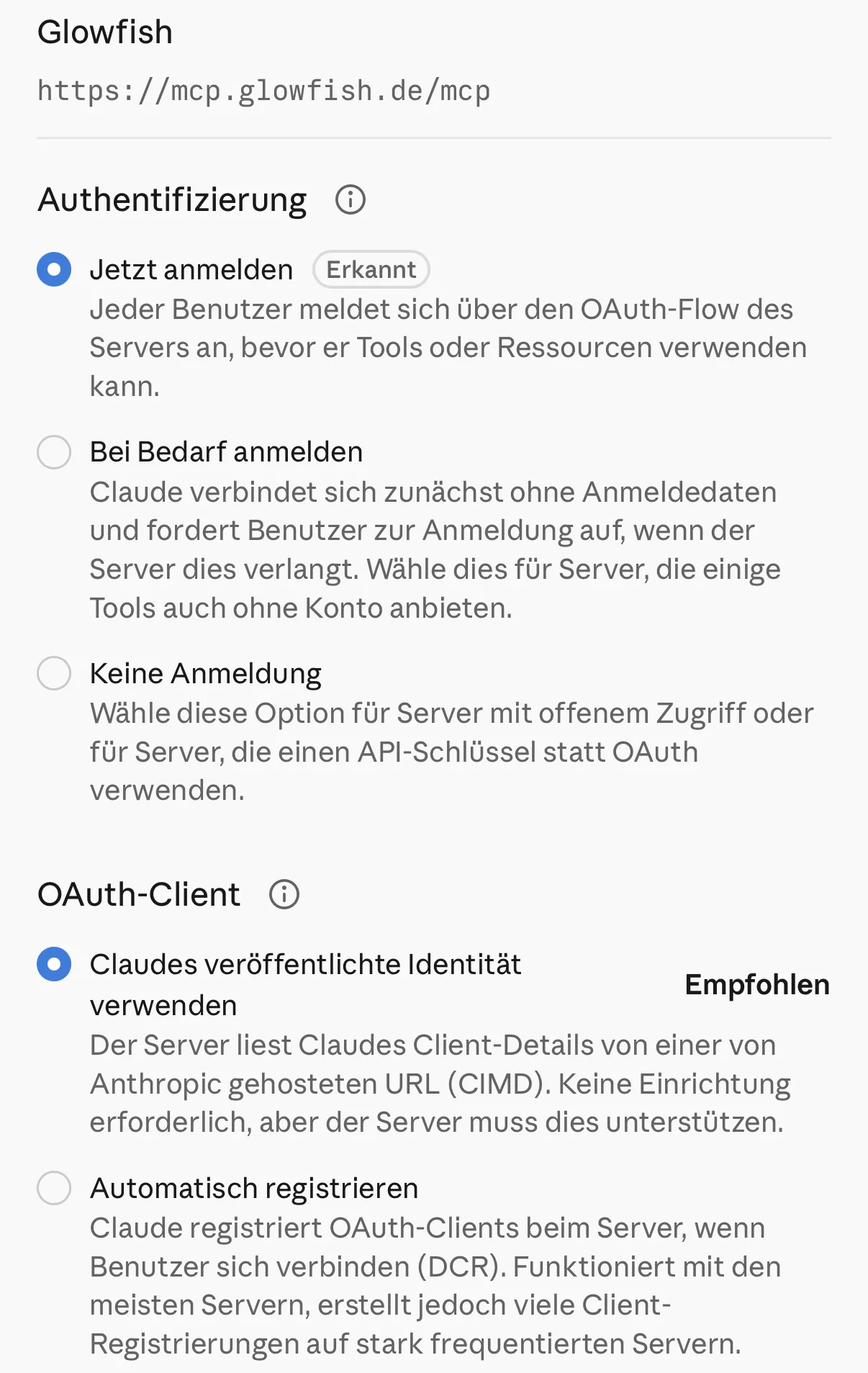
https://mcp.glowfish.de/mcp, then “Continue”. - Leave authentication “Sign in now” and OAuth client “Use Claude’s published identity” unchanged and add the connector.
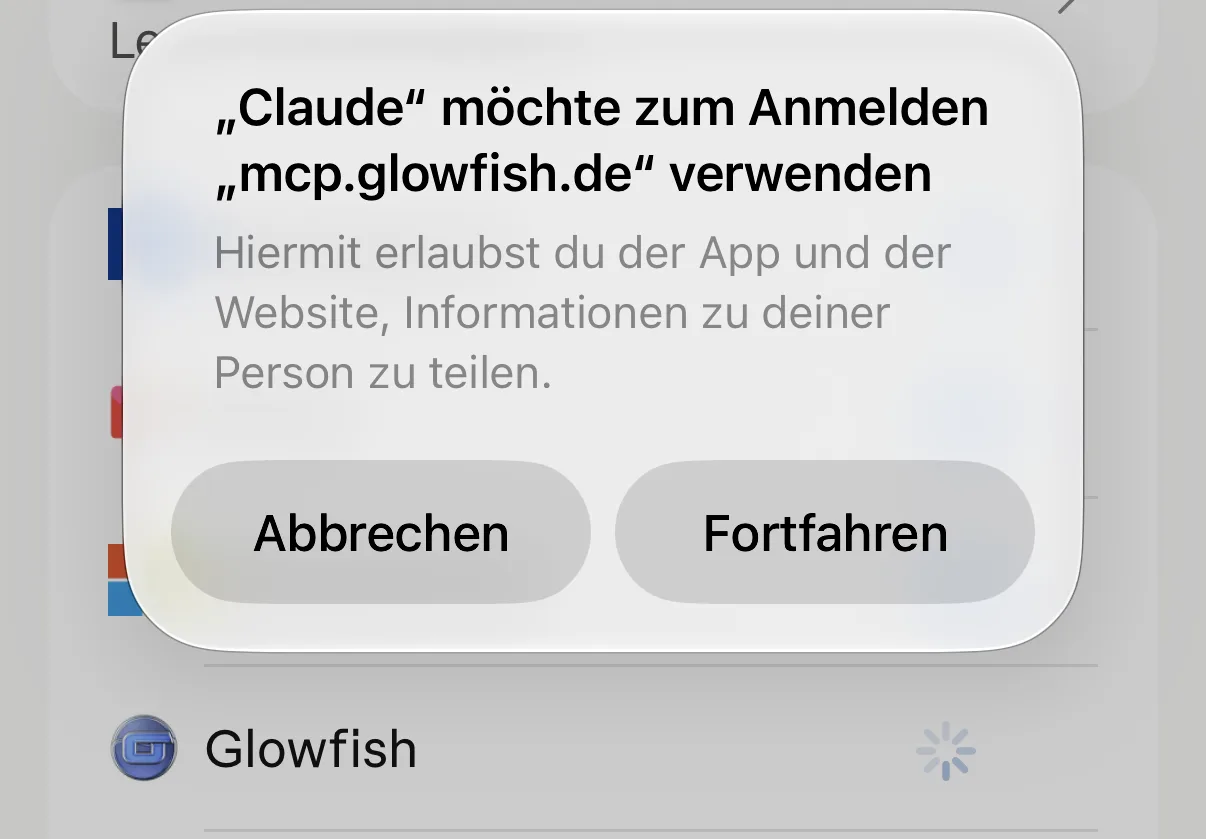
- Tap “Connect” next to “Glowfish”, confirm the prompt with “Continue” and sign in to the customer portal.
- Choose permissions and services and agree. In the chat, the connector can then be switched on and off in the tools menu.
2. Rights
| Right | Allows |
|---|---|
| Read | Status, load, active and ended contracts, invoices, domains, tickets |
| Control | Start, shut down and restart after your confirmation |
| Configure | Domains, DNS, mailboxes, databases, PHP, certificates, game settings |
| Edit website | Files in the web space, test copies, preview, publishing |
| Ordering | Order services, confirmed with an SMS code |
| Commands on the server | Install software and configure the operating system, only on servers you enable for this in the customer portal |
3. Examples
- “How are my servers doing?”
- “Set up info@my-domain.com.”
- “Build me a website for my workshop.”
- “Install a mail server with spam filter on my server.”
- “Back up the world and restart the Valheim server.”
- “Which invoices are open?”
- “Which of my contracts have ended, and since when?”
- “Order the domain my-company.com with two mailboxes.”
- “Add an extra IP address to my vServer.”
- “Order a Minecraft server for five friends.”
- “Set up server monitoring with SMS alerts for my website.”
4. Websites and email in web hosting
- Websites of any kind from your own HTML, CSS, JavaScript and PHP, first as a test copy with a preview. Publishing creates a restore point.
- Create domains, DNS records, mailboxes, aliases, mailing lists and databases, set up SPF, DKIM and DMARC
- Configure PHP version, certificates, HTTPS and cron jobs
- Install and update more than 130 applications from the catalog, such as WordPress, Joomla, TYPO3, Shopware, PrestaShop, Nextcloud, Moodle or Matomo
- Check the website and fix open checklist items
- Query databases, up to 200 rows per query, and modify them, e.g. create tables, add columns or correct entries. Before the first change in any hour a backup of the database is created.
- Analyse disk usage, traffic, mailbox delivery logs, error logs and statistics
- Set up out-of-office replies and filters for mailboxes
- Create, list and remove FTP and SFTP accounts. You set the password yourself via a one-time link. Read SSH settings and change them with the right “commands on the server”.
- Create restore points and backups, restore files from the trash
You set mailbox passwords yourself via a one-time link valid for 24 hours. The assistant only moves files to the trash. Firewall, country blocking as well as deleting domains, mailboxes and databases stay in the web hosting panel, and the assistant gives you the right link. Your own system services such as a Node.js server or Docker run on a vServer.
5. Setting up software on your vServer
Our vServers run as Incus containers or as virtual machines with KVM. Both can be fully managed through the AI interface:
- Query status, load, metrics, processes, traffic and backups
- Start, shut down and restart after your confirmation
- Diagnostics for problems: disk, services, errors, memory and network
- Run commands, including long installations, and read and write files on the server
- Create restore points (snapshots) and roll back
- Set the hostname, connect your own domain, set reverse DNS for the IP address
- Set up, change or disable SSH: port, public keys, root login, key-only login. You confirm every change with an SMS code.
On a vServer the AI assistant can set up basically any software that runs on Linux and fits your plan, no Linux skills required. It runs the commands, writes the configuration and checks at the end that service, port and certificate are in order. A few examples:
- Mail server with Postfix, rspamd and greylisting, including MX, SPF, DKIM, DMARC and reverse DNS
- Web server with nginx or Apache, PHP and a Let's Encrypt certificate
- Databases such as MariaDB, PostgreSQL or Redis
- Docker and Docker Compose with any containers
- Nextcloud, Gitea, n8n, Uptime Kuma or Grafana
- Node.js and Python applications as always-on services
- Reverse proxy with Caddy or Traefik
- Voice servers such as TeamSpeak or Mumble
- Automatic backups with restic or BorgBackup
- Firewall, Fail2ban and server hardening
Commands on the server only run once you enable this for that server in the customer portal under "KI-Anwendungen" (AI applications). Before the first change Glowfish sets a restore point that stays available for 48 hours. Long installations can run for up to 15 minutes. Limits come from the plan and the container: kernel modules cannot be loaded, for example. In that case the assistant tells you why and suggests a suitable plan.
6. Ordering via chat
With the "Order" right your AI assistant orders further services right in the chat. Beforehand it states product, price, billing interval, term and notice period. The order is only placed once you enter the code we send you by SMS.
- vServers as a container or with KVM, with the operating system of your choice
- Web hosting plans and Domain & Mail
- Domains, for example right after the assistant has checked that your preferred domain is available
- Spieleserver Flex game servers for all our games
- Additional features for existing contracts, such as extra IP addresses, additional drives or a custom name for your game server
- DynDNS, server monitoring and SMS packs
- Upgrade to a larger plan
Vouchers can be redeemed along the way. Several steps also work in one sentence, for example a domain with mailboxes, databases and WordPress, as one combined order with a single code. Payment uses your stored payment method. Orders via AI have an upper limit, larger orders go through the customer portal. Order confirmation and cancellation policy arrive by email as usual.
7. Security
- Login via OAuth 2.1 with PKCE through the customer portal, with two-factor authentication or passkey. The AI application never receives your password.
- Rights apply per connection: read, control, configure, edit website, order and commands on the server. You also choose the servers and services the application may access.
- Every tool carries the MCP annotation read-only, additive or modifying. You confirm modifying actions such as restarts or DNS changes yourself in the chat, the AI cannot trigger them on its own.
- Commands on a server only after you enable them per server, orders only with an SMS code. Commands run isolated inside your server with your permissions.
- The AI interface does not set up services that violate the terms of service. See sections 4.10 and 4.14 of the terms of service.
- Your AI application only sees what you allow when connecting. You set passwords yourself via a one-time link. They never appear in the chat.
- Before changes to a server, Glowfish automatically creates a restore point that remains available for 48 hours.
- Every action is logged under “AI applications” in the customer portal. There you can disconnect applications at any time.
- Deleting, reinstalling, restoring and cancelling remain in your hands in the customer portal.
8. Your own agents
For your own programs, create a personal key under “AI applications” in the customer portal and send it as Authorization: Bearer to the same address.
9. All tools
As of MCP server version 1.0.24. Your AI application only sees the tools it has rights for.
| Area | Tools |
|---|---|
| Overview read-only |
lageempfehlung_ablehnen |
| vServer read-only |
server_listeserver_detailsserver_metrikenserver_prozesseserver_trafficserver_sicherungenserver_diagnose |
| Control vServer modifying, with confirmation |
server_steuernserver_hostnameserver_domain_verbindenserver_sicherungspunkt |
| SSH on the vServer with SMS code |
server_ssh |
| Commands and files on the server after enabling per server |
befehl_ausfuehrenbefehl_ergebnisbefehle_freigebengast_datei_lesengast_datei_schreiben |
| Web hosting more than 160 functions by right |
webspace_listewebspace_detailswebspace_wegewebspace_aufruf |
| Mailboxes and databases read-only and modifying |
postfach_kennwort_linkdatenbank_abfragendatenbank_aendern |
| Domains and DNS modifying, with confirmation |
domainsdns_domaindns_domain_setzendns_domain_loeschen |
| Game servers, web radio, IRL relay read-only and controlling |
spieleserver_listespieleserver_detailsspieleserver_steuernwebradio_listewebradio_detailswebradio_steuernrelay_detailsrelay_neustart |
| Contracts (active and ended) and invoices read-only |
vertraegerechnungenkatalog |
| Ordering with SMS code |
angebot_erstellenbestellung_bestaetigen_anfordernbestellung_abschliessenbestellung_status |
| Several steps from one sentence with confirmation |
vorhaben_pruefenvorhaben_anlegenvorhaben_listevorhaben_statusvorhaben_abbrechenvorhaben_wiederholen |
| Support read-only and additive |
stoerungenhilfe_suchenhilfe_lesenticketsticket_lesenticket_eroeffnenticket_antworten |
| Confirmations in the chat card for the human user |
aktion_bestaetigen |
Ready-made workflows (prompts): server health check, prepare a game night, create a website, new email address, domain with mailboxes.
Order a plan
The AI interface is included free of charge with every vServer and every web hosting plan.
The special terms of the AI interface apply. Questions are answered by support at support@glowfish.de.